将Azure资源描述为ARM Template

这篇文章发布于一年多前,信息可能已过时。
ARM Template是定义Azure资源的json格式文件。
ARM Template可帮助您以代码的形式实现基础架构的实践。
但是,首先要创建ARM Template有点困难。
因此,这一次,我将告诉您在需要部署新资源时如何有效地创建ARM Template 。
我将首先说明快速理解如何将新资源描述为json格式的方法,然后向您展示一些示例。
1.从Azure Portal导出模板
从头开始创建模板很困难。因此,我建议您首先在Azure门户上创建目标资源,然后导出资源模板以将其用作参考。
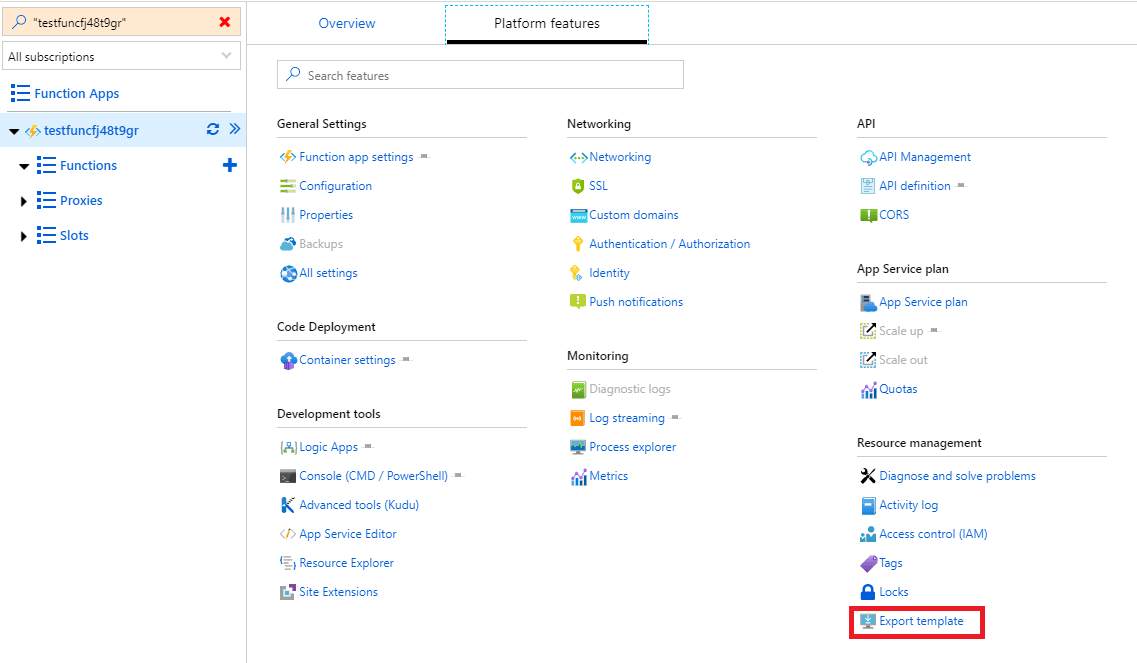
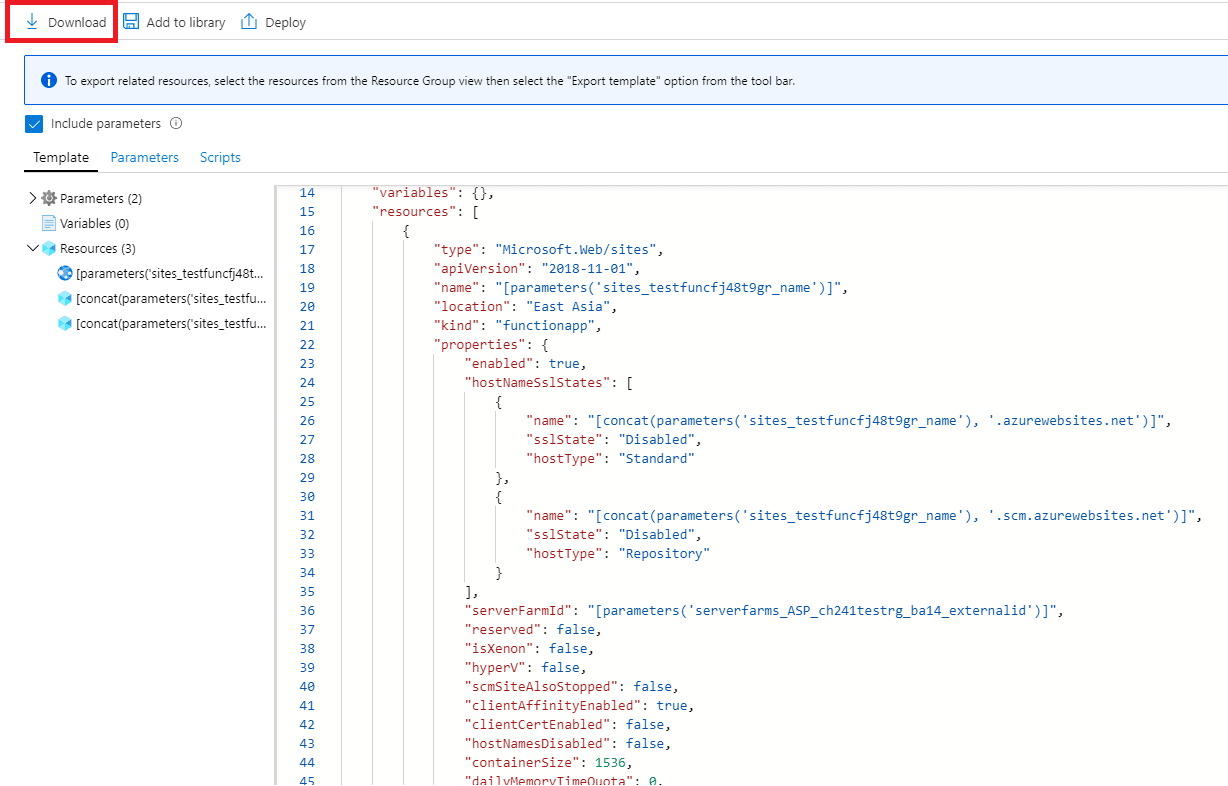
在这里,您可以看到您的资源被描述为ARM Template 。
2.阅读正式文件
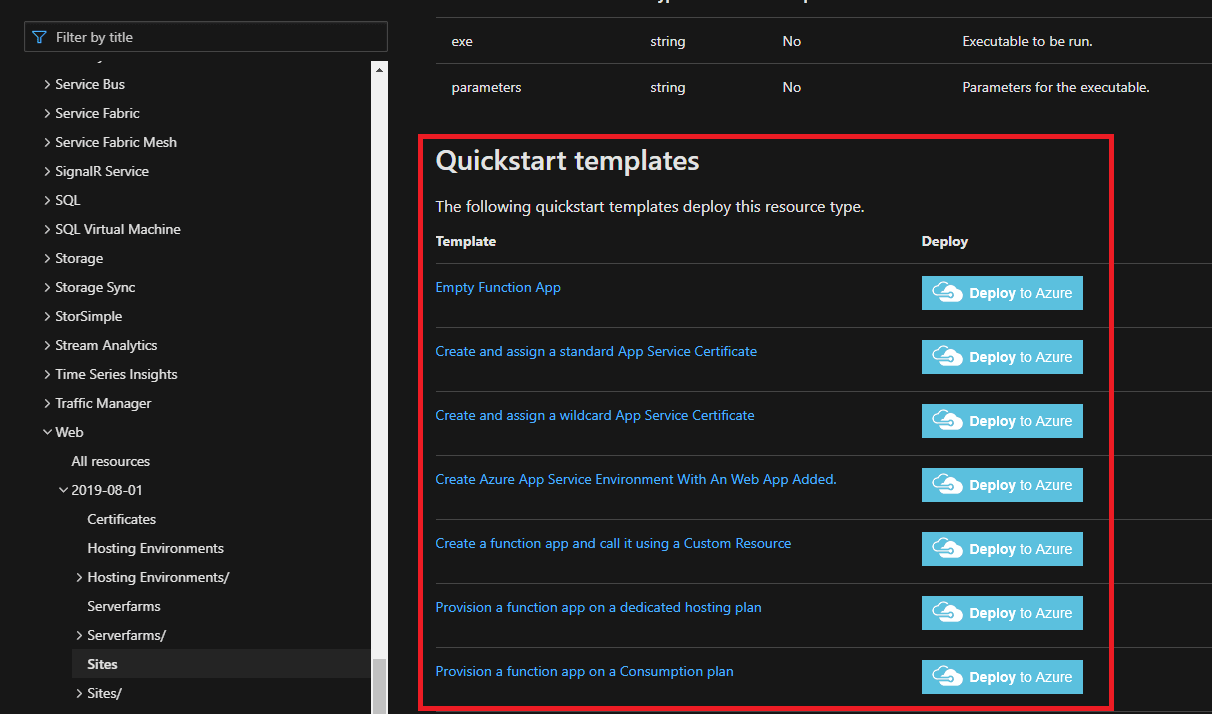
接下来,您可以参考Microsoft官方文档1。 在本文档中,您可以找到定义了哪些类型的属性,可以指定什么样的值等。 您可以通过阅读这些文档来修改导出的模板。 您还可以在每个参考页面的底部找到示例模板。
3.检查REST API参考
在某些情况下,您找不到关于ARM Template的某些属性对象的详细信息的任何说明。
在这种情况下,REST API参考可能会对您有所帮助。
当您运行ARM Template ,将在后端调用关联的REST API。
这意味着您可以通过REST API参考2来猜测对象定义。
其他技巧
Template Function
您可以使用模板函数来有效表示Azure资源。
例如,您可以使用copy功能创建一个数组对象。
1{2 "$schema": "https://schema.management.azure.com/schemas/2018-05-01/deploymentTemplate.json#",3 "contentVersion": "1.0.0.0",4 "parameters": {5 "ipAddressArray": {6 "type": "string",7 "metadata": {8 "description": "IP Address split by a comma."9 }10 }11 },12 "resources": [13 {14 "type": "Microsoft.Web/sites/config",15 "name": "functionConfig",16 "apiVersion": "2018-11-01",17 "location": "[resourceGroup().location]",18 "scale": null,19 "properties": {20 "copy": [21 {22 "name": "ipSecurityRestrictions",23 "count": "[length(split(parameters('ipAddressArray'), ','))]",24 "input": {25 "ipAddress": "[string(split(parameters('ipAddressArray'), ',')[copyIndex('ipSecurityRestrictions')])]",26 "name": "[concat(resourceGroup().location, copyIndex('ipSecurityRestrictions'))]"27 }28 }29 ]30 }31 }32 ]33}假设ipAddressArray是一个字符串参数,它表示一组用逗号分隔的IP地址。
10.0.0.0/16,10.0.1.0/16,...
该ARM Template将按以下方式进行编译:
1{2 "$schema": "https://schema.management.azure.com/schemas/2018-05-01/deploymentTemplate.json#",3 "contentVersion": "1.0.0.0",4 "parameters": {5 "ipAddressArray": {6 "type": "string",7 "metadata": {8 "description": "IP Address split by comma"9 }10 }11 },12 "resources": [13 {14 "type": "Microsoft.Web/sites/config",15 "name": "functionConfig",16 "apiVersion": "2018-11-01",17 "location": "japaneast",18 "scale": null,19 "properties": {20 "ipSecurityRestrictions": [21 {22 "ipAddress": "10.0.0.0/16",23 "name": "japaneast0"24 },25 {26 "ipAddress": "10.0.1.0/16",27 "name": "japaneast1"28 },29 ...30 ]31 }32 }33 ]34}您可以看到ipSecurityRestrictions由copy功能定义。
有关更多信息,请参见Microsoft官方文档3。
其他工具
Resource Explorer
Resource Explorer 4对于您了解如何将资源描述为json格式也很有用。
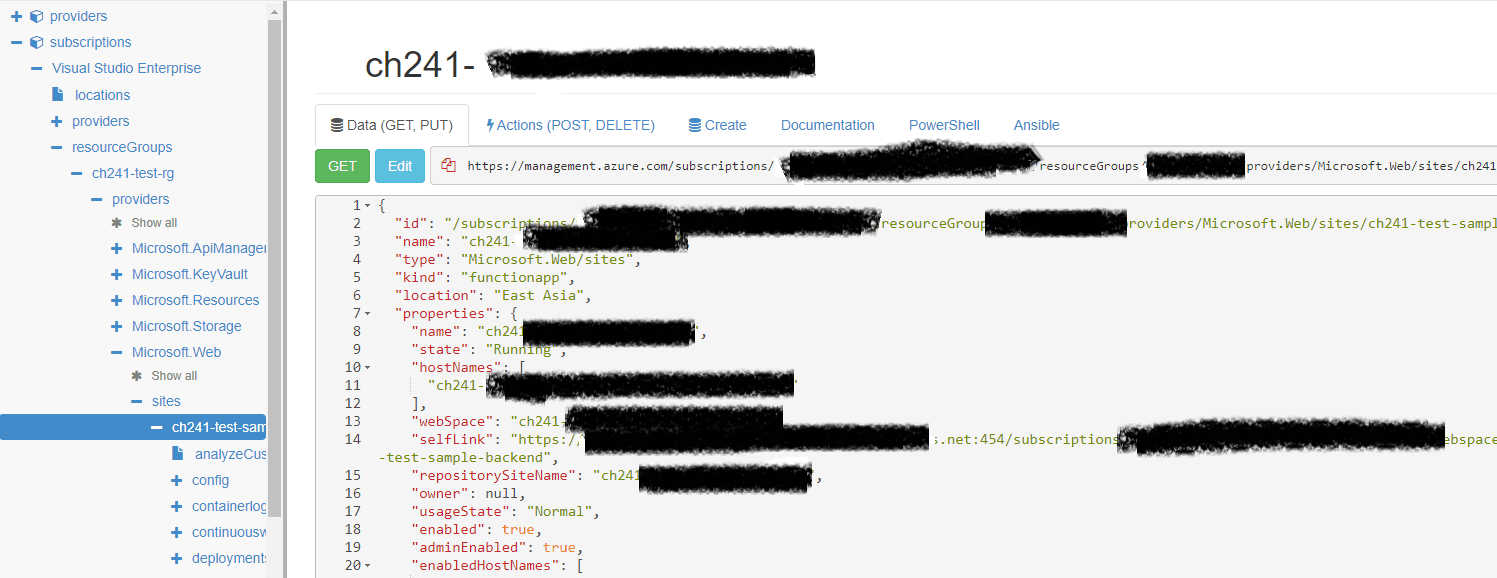
当您要检查资源的属性时,此工具很有用。
假设您需要从API Management获取managedId 。
1{2 "value": [3 {4 "id": "/subscriptions/your-subscription-id/resourceGroups/your-resource-group-name/providers/Microsoft.ApiManagement/service/your-api-management-service-name",5 "name": "your-apim-name",6 "type": "Microsoft.ApiManagement/service",7 "location": "Japan East",8 "etag": "xxx",9 "properties": {10 "publisherEmail": "xxx",11 "publisherName": "xxx",12 "notificationSenderEmail": "xxx",13 "provisioningState": "Succeeded",14 "targetProvisioningState": "",15 "createdAtUtc": "2020-04-13T09:37:25.5871876Z",16 "gatewayUrl": "https://your-apim-name.azure-api.net",17 "gatewayRegionalUrl": "xxx",18 "portalUrl": "https://your-apim-name.portal.azure-api.net",19 "developerPortalUrl": "https://your-apim-name.developer.azure-api.net",20 "managementApiUrl": "https://your-apim-name.management.azure-api.net",21 "scmUrl": "https://your-apim-name.scm.azure-api.net",22 "hostnameConfigurations": [],23 "publicIPAddresses": [24 "x.x.x.x"25 ],26 "privateIPAddresses": null,27 "additionalLocations": null,28 "virtualNetworkConfiguration": null,29 "customProperties": {30 "Microsoft.WindowsAzure.ApiManagement.Gateway.Security.Protocols.Tls10": "False",31 "Microsoft.WindowsAzure.ApiManagement.Gateway.Security.Protocols.Tls11": "False",32 "Microsoft.WindowsAzure.ApiManagement.Gateway.Security.Protocols.Ssl30": "False",33 "Microsoft.WindowsAzure.ApiManagement.Gateway.Security.Ciphers.TripleDes168": "False",34 "Microsoft.WindowsAzure.ApiManagement.Gateway.Security.Backend.Protocols.Tls10": "False",35 "Microsoft.WindowsAzure.ApiManagement.Gateway.Security.Backend.Protocols.Tls11": "False",36 "Microsoft.WindowsAzure.ApiManagement.Gateway.Security.Backend.Protocols.Ssl30": "False",37 "Microsoft.WindowsAzure.ApiManagement.Gateway.Protocols.Server.Http2": "False"38 },39 "virtualNetworkType": "None",40 "certificates": null41 },42 "sku": {43 "name": "Developer",44 "capacity": 145 },46 "identity": {47 "type": "SystemAssigned",48 "principalId": "your-id",49 "tenantId": "your-tenant"50 }51 },Resource Explorer将帮助您了解资源的结构。
在这种情况下,您可以通过identity.principalId检索ID。
因此,这是访问id的template function ;
1"[reference(parameters('resourceId'), 'api-version', 'Full').identity.principalId]"ARM Template Viewer
ARM Template Viewer ( Visual Studio Code的扩展)对Visual Studio Code化资源也很有用。
这是由ARM Template Viewer创建的图。
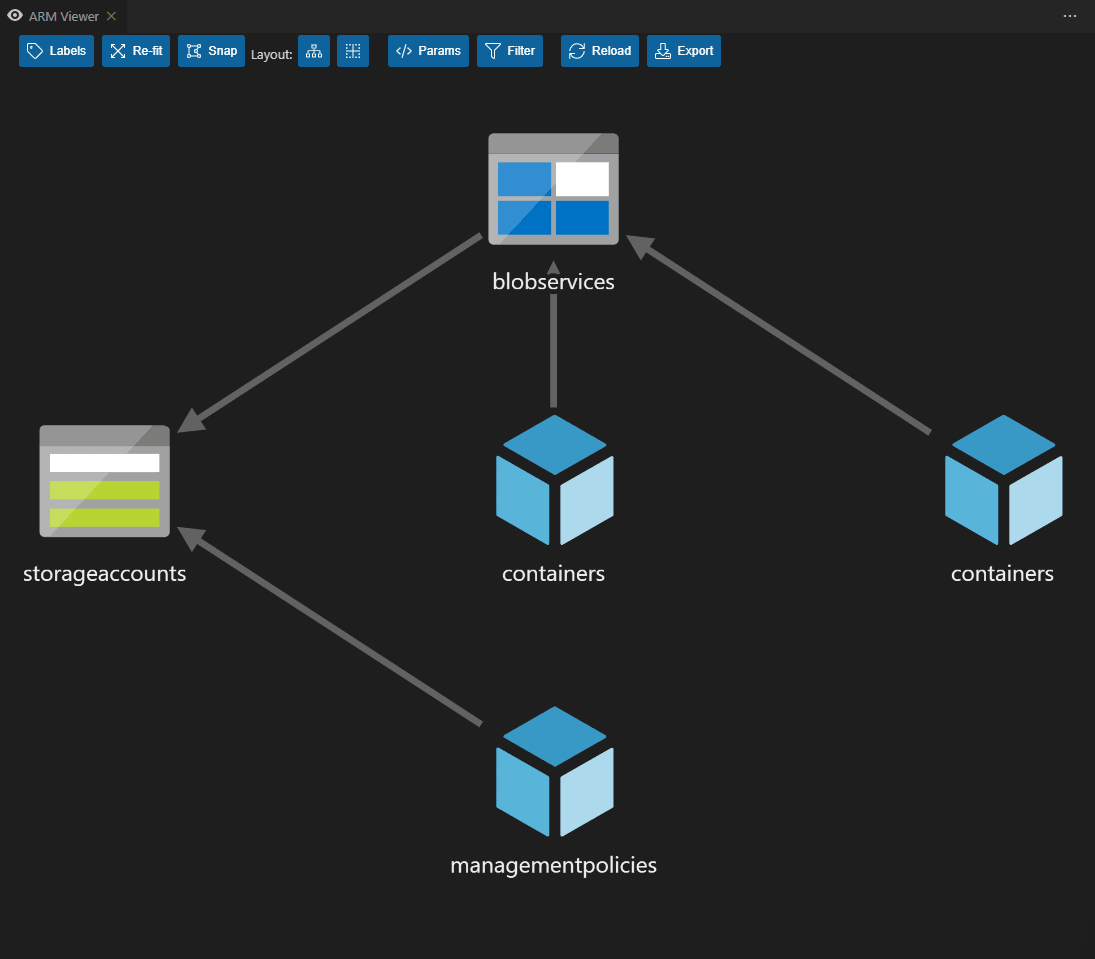
它将帮助您了解每种资源之间如何相互依赖。
摘要
在本文中,我已经解释了如何有效地创建新的ARM Template 。
现在,您可以通过ARM Template创建所需的任何资源。祝好运!